
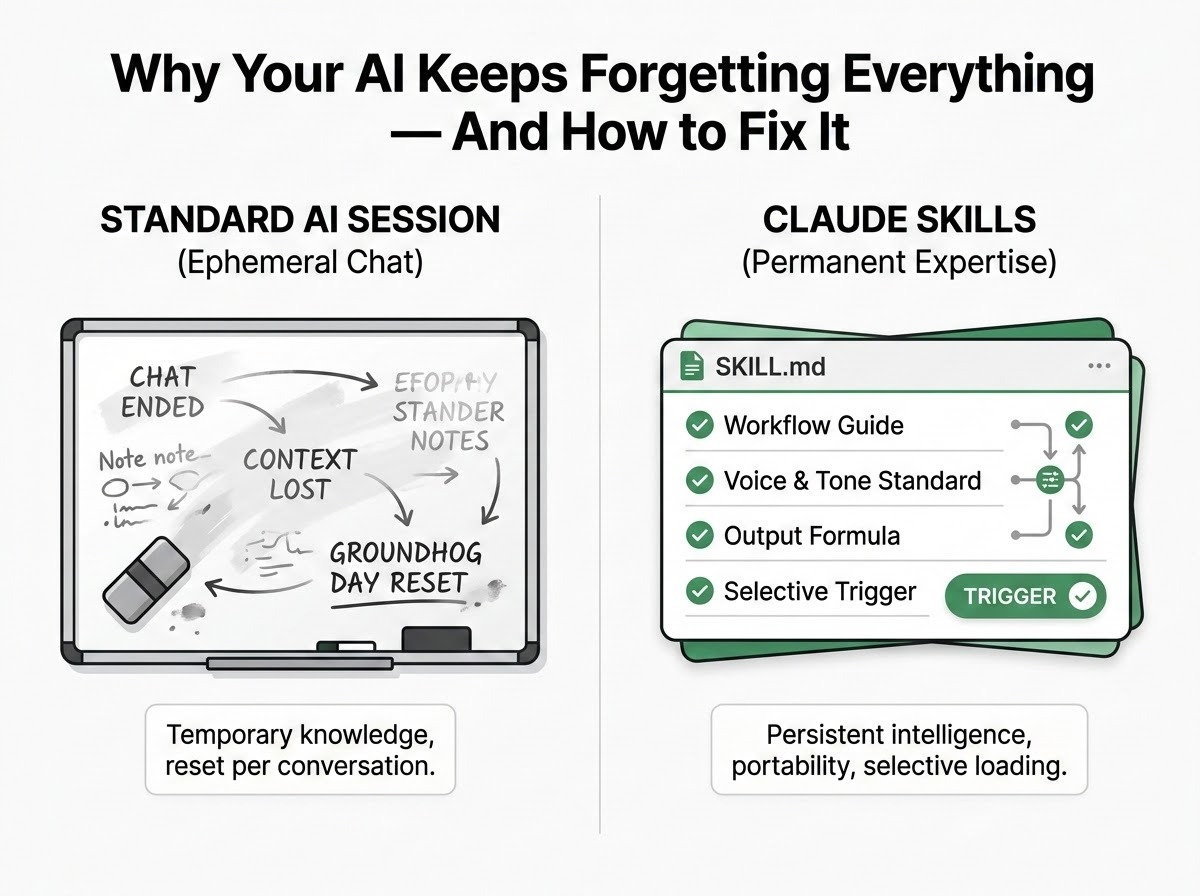
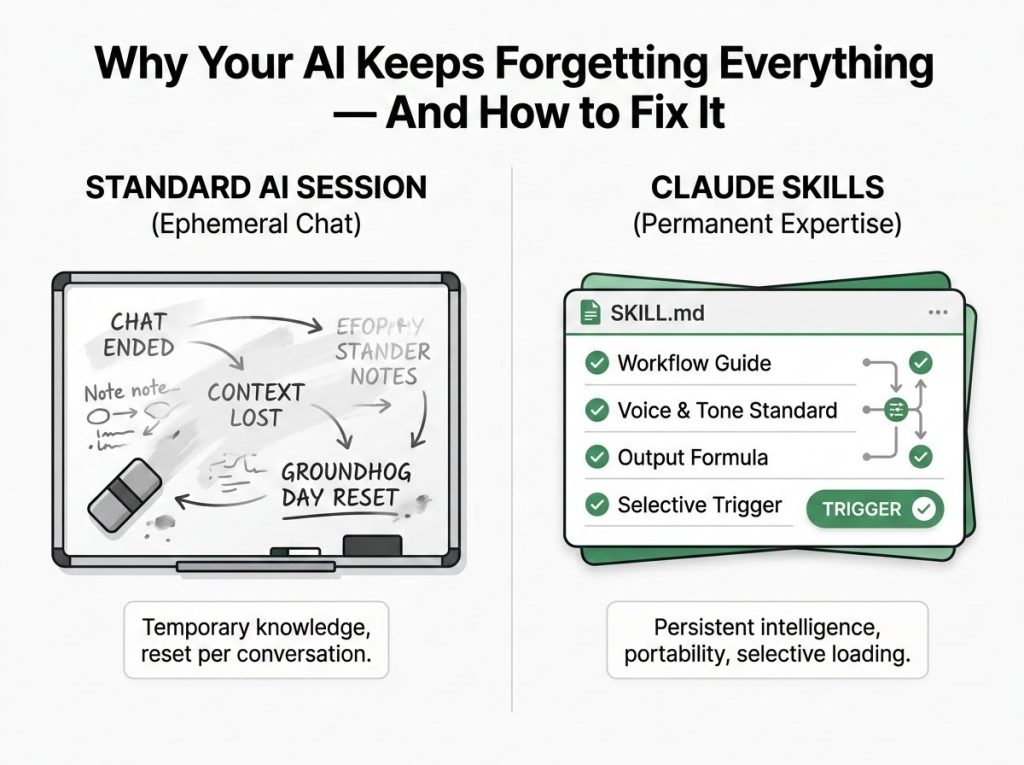
Claude Skills address the inefficiency of re-explaining workflows in every AI session by providing permanent, structured instruction packages. This architectural shift moves beyond simple prompting, allowing the system to recognize and apply specific expertise automatically. It eliminates the need for repetitive context-pasting while maintaining consistency across different conversations.
The system utilizes a progressive disclosure model that loads intelligence only when relevant, optimizing performance and token usage. Success depends on precisely engineered triggers and strict naming conventions. By packaging institutional knowledge into portable files, users can transform ephemeral AI interactions into scalable, reliable workflows for specialized professional tasks.
Most people use AI like a whiteboard: useful in the moment, blank by morning. Claude Skills are what happens when you stop accepting that.
By William, U.S. Army (Retired)- Owner, Chief Editor & CEO
There is a specific frustration that hits somewhere around the twentieth time you paste your style guide into a chat window.
You have been there. You open a new conversation, and the AI is friendly and capable and completely blank. It has no idea how you write, what your audience cares about, what terms your company uses, or why certain approaches work for your workflow and others don’t. So you explain — again. You paste in your context — again. You spend the first fifteen minutes of every session re-training a system that should already know you.
This is not a small inefficiency. It is the thing quietly throttling every AI workflow that depends on consistency, specificity, or domain expertise. And it has a name: the “Groundhog Day” effect. Same conversation. Every time.
The shift that solves this has been quietly arriving for the past several months, and it’s called Claude Skills. Not a feature update. Not a new prompt template. A different architecture for how AI intelligence gets organized and deployed.
Here’s what it actually means — and why it changes more than most people realize.
Key Takeaways
- Claude Skills are structured instructional packages that teach Claude how to handle specific tasks permanently, so you stop re-explaining your workflows in every new conversation.
- The architecture uses a three-level “Progressive Disclosure” system that loads intelligence only when it’s relevant — keeping responses fast and token-efficient.
- The single most critical element of any skill is a precisely engineered description field that tells Claude when to activate it, not just what it does.
- The difference between a skill that works reliably and one that triggers inconsistently comes down to one formula: what it does + when to use it + key capabilities.
- You can build and test a functional skill in a single 15-to-30-minute session — even without a technical background.
The Problem With How We’ve Been Using AI
Before getting into architecture, it’s worth naming the pattern clearly, because most people have adapted to it without realizing how much it costs them.
The standard AI workflow is what you might call stochastic prompting: the hit-or-miss process of guessing what phrasing will get the response you want. You try a prompt. It works okay. You try it again the next day and it works differently. You adjust. You experiment. You accumulate a personal library of “prompts that work” and paste them in at the start of every relevant session.
This is skill-building for a system that doesn’t retain anything. Every insight into how to get better output lives in the human’s memory or clipboard, not in the AI’s operating context. The moment a new conversation starts, everything resets.
For casual use, this is tolerable. For workflows that depend on consistent voice, consistent domain knowledge, consistent process — content creation, client work, specialized research, technical operations — it’s a compounding drag. Every session resets to zero.
Claude Skills are designed to solve that problem structurally rather than through better prompting.
What a Skill Actually Is (And What It Isn’t)
A Claude Skill is not a prompt template. It’s not a saved conversation. It’s not a system instruction you paste in at the start of a chat.
A Skill is a structured folder — a small, portable package of instructions that lives in your Claude environment and teaches the system how to handle a specific repeatable task. Once it’s built and deployed, Claude can recognize when that skill is relevant, load the appropriate instructions automatically, and apply your expertise without being asked.
The simplest way to understand what this changes is through an analogy the design itself uses: the professional kitchen.
Model Context Protocol — the layer that connects Claude to external tools, databases, and APIs — provides the kitchen. The equipment, the ingredients, the connectivity. What it doesn’t provide is the recipe: the specific, step-by-step knowledge of how your organization uses those ingredients to create something valuable.
Without a skill, Claude has access to the tools but no institutional knowledge of how to use them for your specific context. With a skill, it has both. The gap between “can access your CRM” and “knows how your team qualifies leads and writes follow-up emails” is exactly the gap Skills are designed to close.
This distinction matters because most implementations that underperform aren’t failing due to tool access. They’re failing due to missing workflow knowledge. Users get inconsistent outputs and blame the connector. The real gap is the absence of a recipe.
The Architecture Behind the Intelligence: Progressive Disclosure
The most technically interesting thing about how Skills work is what happens under the hood — and it’s also what makes them different from simply adding a long system prompt to every conversation.
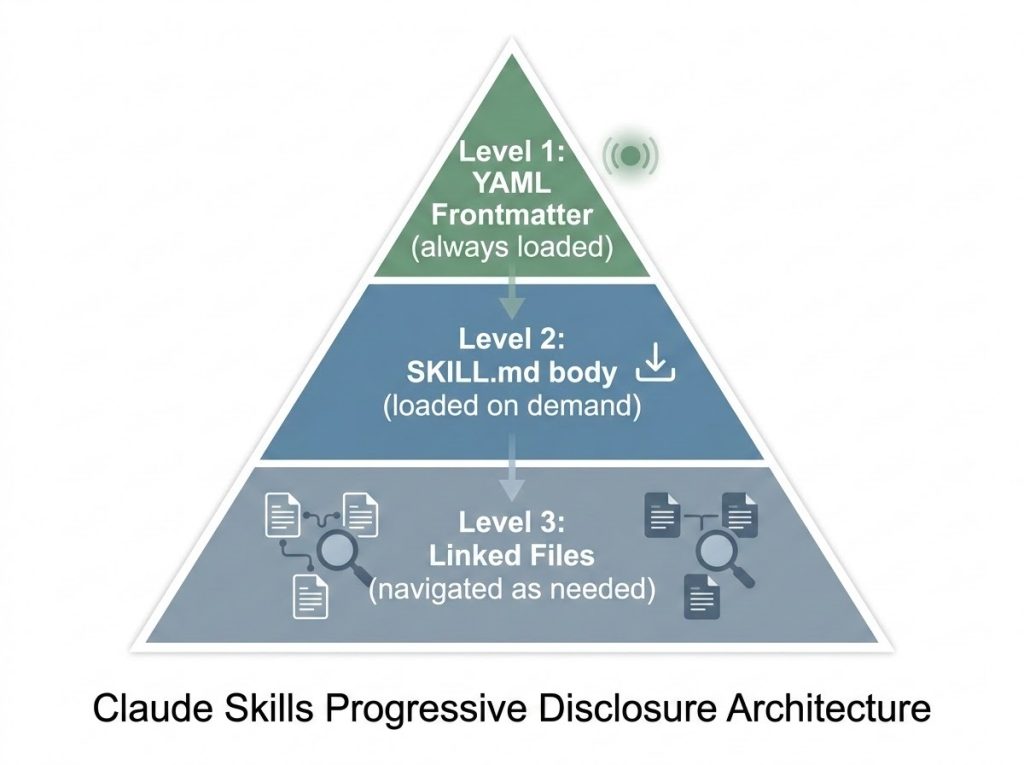
The system uses what’s called Progressive Disclosure: a three-level hierarchy that loads intelligence only when it’s relevant to the task at hand.
Level 1: The YAML Frontmatter — the brain that’s always on. Every skill contains a lightweight metadata block at the top of its instruction file. This is the only piece of the skill that’s always loaded into Claude’s context. It’s the “logic gate” — the minimal information Claude needs to recognize when a skill is relevant. It doesn’t contain the full instructions. It contains enough to know whether to open the recipe book.
Level 2: The SKILL.md Body — the full instructions, loaded on demand. Once Claude determines a skill is relevant, it pulls in the complete instruction set: the detailed guidance, process steps, voice standards, output requirements. This is where the actual expertise lives. It only enters active context when it’s needed.
Level 3: Linked Files — deeper assets, navigated as required. Additional assets — templates, reference documents, code libraries, icons, documentation — sit in linked folders within the skill package. Claude navigates these only when a specific task requires them.
The practical consequence: Skills keep Claude sharp, responsive, and token-efficient in a way that dumping a thousand tokens of instruction into every conversation doesn’t. The intelligence is there when you need it. It’s not cluttering every response when you don’t.
This architecture is why Skills can carry genuinely sophisticated expertise — detailed voice profiles, complex workflow logic, multi-step processes — without degrading performance in conversations where that expertise isn’t relevant.
The Most Important 1,024 Characters You’ll Ever Write
If there is one thing to take away from how Skills work technically, it’s this: the description field is everything.
This is the field in the YAML frontmatter that tells Claude when to activate a skill. It is the trigger. And it comes with hard constraints:
- It must be under 1,024 characters. Anything beyond that is ignored.
- It cannot contain XML tags (the < or > characters), which interfere with Claude’s internal parsing.
Within those constraints, the description does an enormous amount of work. A vague description produces a skill that never loads when it should. An overly broad description produces one that loads when it shouldn’t. The goal is what you might call a “Goldilocks description” — precise enough to trigger reliably on the right requests, constrained enough to stay out of the way for everything else.
The formula that works is straightforward:
[What it does] + [When to use it] + [Key capabilities]
The “when to use it” component is the most critical and the most commonly missed. A description that only describes what a skill does gives Claude no signal about when to pull it in. Trigger phrases — the literal words or phrases a user is likely to type — are what close that gap.
Here’s what that looks like in practice:
| Version | Description |
| Too vague | “Helps with projects.” |
| Too technical | “Implements the Project entity model with hierarchical relationship structures.” |
| Just right | “Manages Linear project workflows. Use when the user mentions ‘sprint’, ‘Linear tasks’, or ‘project planning’. Handles task creation and status tracking.” |
The difference between the vague version and the precise one isn’t just quality. The vague version will silently fail. The precise version will load automatically when the user says “let’s plan out this sprint.” That reliability — a 90%+ trigger rate on relevant queries — is the benchmark worth targeting.
The Technical Rules That Are Actually Rules
A few technical requirements for Skills aren’t stylistic suggestions. They’re requirements the environment enforces. Getting any of these wrong means the skill simply won’t load.
The instruction file must be named exactly SKILL.md. Not skill.md. Not SKILL.MD. Case sensitivity is enforced.
Folder names must use kebab-case. notion-project-setup works. Notion Project Setup doesn’t. Neither does notion_project_setup. Spaces, underscores, and capital letters are not allowed in folder names.
No README.md inside the skill folder. This is the most counterintuitive rule, especially for developers who default to including a README in every project. The reason is simple: two competing instruction files create ambiguity. Everything meant for Claude lives in SKILL.md or the references/ directory. Human-facing documentation belongs outside the skill folder entirely.
These aren’t arbitrary constraints. They’re the result of how the environment parses and loads skills. One violation means the skill doesn’t load. It doesn’t fail loudly; it just doesn’t run.
Why “I’ll Just Use a Long Prompt” Doesn’t Scale
At this point, a reasonable objection is: this seems like a lot of structure. Can’t you get similar results by putting detailed instructions in a system prompt or a long opening message?
You can approximate some of it. But the approach breaks down in a few specific ways that matter for anyone using AI seriously.
First, context window consumption. A detailed system prompt for every conversation uses tokens whether or not that expertise is relevant to the current task. With Skills, that token budget is spent selectively. The expertise is there when you need it; it’s not burning context when you don’t.
Second, portability. A skill built according to the open standard works across Claude.ai, Claude Code, and the API. A prompt template is a document you move manually from place to place.
Third, reliability. A well-engineered skill trigger is deterministic in a way that manual prompt pasting isn’t. You can test it, tune it, and measure it. The 90% trigger rate benchmark gives you something to optimize toward. “Copy and paste and hope” doesn’t.
From Prompt Engineer to Workflow Architect
There is a framing shift embedded in how Skills work that’s worth making explicit, because it changes what “getting better at AI” actually means.
Right now, most people optimize for prompting: learning what phrasing produces better outputs, saving the good prompts, iterating on them manually. This is useful, but it’s fundamentally individual and ephemeral. The expertise lives in the prompt. The prompt lives in a document or a clipboard. If you leave the organization, or the document gets lost, or someone new joins the team, the knowledge doesn’t transfer.
A skill is a different class of artifact. It’s the expertise packaged, portable, and triggerable. Building a skill for a repeatable workflow means the next person on your team benefits from everything you’ve learned about how to get good results from that workflow — without having to rediscover it themselves.
This is what the shift from “stochastic prompting” to “deterministic architecture” actually means. You’re not optimizing a prompt. You’re building something that behaves consistently, can be distributed, and improves over time as you refine the trigger logic.
The skill-creator tool — a meta-skill designed specifically to help build other skills — makes this accessible even without a technical background. It flags descriptions that are too vague or too broad, suggests trigger phrases based on your stated goals, and generates the initial YAML structure. The whole first iteration of a functional skill, from blank page to working deployment, takes fifteen to thirty minutes.
What Belongs in a Skill (and What Doesn’t)
Not everything should be a skill. The architecture works best for tasks that are:
Repeatable. If you do it once and never again, a skill is over-engineered for the purpose.
Domain-specific. The more the workflow depends on knowledge that isn’t general-purpose — your voice, your company’s process, your field’s terminology — the more value a skill adds.
Currently inconsistent. If you’re getting different results from the same type of request across different sessions, that inconsistency is usually a symptom of missing workflow knowledge. A skill addresses it at the structural level.
Workflows that tend to benefit most: content creation with a consistent voice and format, client-facing communications that follow specific protocols, research processes with defined source criteria, code review or documentation tasks tied to specific standards, and any operational workflow that currently lives in a detailed prompt someone on the team guards.
Frequently Asked Questions
What is the difference between a Claude Skill and a system prompt?
A system prompt is always loaded and always consuming context. A Claude Skill uses Progressive Disclosure to load only when relevant, keeping responses efficient and precise. Skills also follow a portable open standard that works across Claude.ai, Claude Code, and the API — a system prompt is environment-specific.
How do I know if my skill’s description is good enough?
The practical test is to ask Claude directly: “When would you use the [skill name] skill?” Claude will quote the description back to you. If the answer describes the right situations, your description is working. If it’s too narrow, too broad, or misses key use cases, you’ll see it immediately in that response — adjust the YAML and test again.
Can I build a skill without a technical background?
Yes, and the skill-creator tool is specifically designed to make this accessible. You describe what you want the skill to do and when, and the tool generates the initial YAML structure, flags trigger problems, and walks you through iteration. The technical rules (SKILL.md capitalization, kebab-case folders) are constraints you learn once, not ongoing complexity.
What happens if I include a README.md in my skill folder?
The skill may not load, or Claude may behave inconsistently because two instruction sources are competing. All documentation intended for Claude must live in SKILL.md or the references/ directory. Human-facing documentation belongs outside the skill folder entirely.
How many skills can I have, and will they interfere with each other?
Multiple skills can coexist, and they’re designed with specificity to prevent unintended overlap. The key is precise description writing: each skill should have a distinct enough trigger profile that Claude can reliably distinguish between them. If two skills are triggering for the same requests, the solution is to tighten the “when to use it” component of each description, and to add explicit “do NOT use for” language where needed.
The Whiteboard Era Is Over
Re-explaining your expertise in every conversation was never a feature. It was a limitation of early AI architecture, normalized by repetition into feeling like just how things work.
Claude Skills are the architectural answer to that limitation. Not a better prompt. Not a saved template. A different class of artifact entirely: expertise that’s packaged, portable, and triggered precisely when it’s needed.
The question worth sitting with isn’t whether this is a meaningful shift. It’s which workflow in your day-to-day work is currently held together by a prompt document someone guards, or a style guide you paste in and pray, or a process that produces different results every time a different person runs it.
That workflow is waiting to be a skill.
Fifteen minutes to build it. Permanent to benefit from.
Keep Learning
- Who Is Responsible When Your AI Agent Makes a Costly Mistake? — Why agentic AI’s biggest risk isn’t accuracy — it’s accountability.
- How to Evaluate AI Vendors Without Getting Sold a Demo — The questions that separate vendors who can deliver from ones who can only present.