
Professionals using AI save an average of one workday per week. However, the most successful individuals do not merely use this time to finish routine tasks faster. Instead, they redeploy those hours toward strategic objectives, judgment-based analysis, and high-value projects that previously lacked the necessary bandwidth for completion.
Research indicates that AI is compressing the career ladder, requiring entry-level employees to demonstrate advanced leadership and problem-solving skills. To build career equity, users must treat AI outputs as drafts rather than finished products. Maintaining human oversight ensures that technology acts as a strategic asset rather than a shortcut.
The professionals pulling ahead in 2026 aren’t optimizing their task list. They’re redeploying the hours AI frees up toward missions their old schedule never had room for.
By William, U.S. Army (Retired)- Owner, Chief Editor & CEO
Table of contents
- The professionals pulling ahead in 2026 aren’t optimizing their task list. They’re redeploying the hours AI frees up toward missions their old schedule never had room for.
- Key Takeaways
- Why Does “Saving Time” With AI Stop Working?
- What Does the Research Actually Say About AI and Productivity?
- The Redeployment Principle: What I Recommend
- How Do You Actually Redeploy the Time AI Gives You Back?
- 6 Steps to Redeploy the Time AI Just Gave You Back
- Frequently Asked Questions
- The Mission Isn’t Finished When the Task Is
- Keep Learning
- Sources researched for the content of this article
In the Army, I watched units get extra manpower and use every bit of it to keep running the same patrol at the same pace. More people, same mission, zero progress. I see the exact same instinct in offices right now, except the extra manpower isn’t a platoon — it’s AI, and it just handed the American professional the biggest productivity gift of their career. Most of them are spending it answering email faster.
Here’s the direct answer, because you shouldn’t have to scroll to get it: if you’re only using AI to save time, you’ve got more people and the same patrol. The professionals actually pulling ahead this year aren’t shrinking their task list. They’re redeploying the hours AI frees up toward the bigger mission nobody had bandwidth for before. Research from the London School of Economics and Protiviti found that professionals using AI are saving an average of 7.5 hours per week, worth around $18,000 per employee per year in productivity gains — call it a full workday, every week, for free. The question this article answers isn’t whether you should use AI. It’s what you do with the day it just handed you.
Key Takeaways
- Professionals using AI save roughly one full workday a week, but the winners aren’t spending it on more of the same tasks — they’re redeploying it toward higher-stakes work.
- Nearly half of all advanced AI use is now going toward analysis, judgment calls, and problem-solving, not routine drafting.
- AI is compressing the career ladder: entry-level roles most exposed to AI are seven times more likely to demand skills that used to show up a decade into a career.
- The professionals treating AI output as a first draft, not a final answer, are the ones building real career equity — trust in AI without review is a liability, not an edge.
- The biggest gap isn’t access to AI. It’s that most employees have never been trained to use it like a strategic asset instead of a shortcut.
Why Does “Saving Time” With AI Stop Working?
I spent 20 years in the Army before I moved into workforce development, and if there’s one thing both jobs taught me, it’s that resources without a strategy just create idle capacity. I’ve sat across from hundreds of professionals mid-transition — service members leaving the military, mid-career people pivoting industries, executives trying to figure out what their teams should even look like next year. Almost every one of them, when AI comes up, describes it the same way: a tool that helps them get through their inbox faster.
That’s not wrong. It’s just small. And it’s exactly where the gap opens up between people who are using AI and people who are winning with it.
Here’s the uncomfortable part of my job: I regularly sit with organizations that gave their teams AI tools eighteen months ago and never followed up with a real strategy for what to do with the capacity it created. The tool got adopted. The mission didn’t change. People used the extra hours to catch up on the same backlog, and then the backlog grew back, because nobody redirected the freed-up time toward anything bigger. That’s not an AI problem. That’s a leadership problem wearing an AI costume — and it’s more common than most executives want to admit.
What Does the Research Actually Say About AI and Productivity?
I don’t bring a claim into a room I can’t back up, so let’s look at what’s actually been measured, not what’s been hyped.
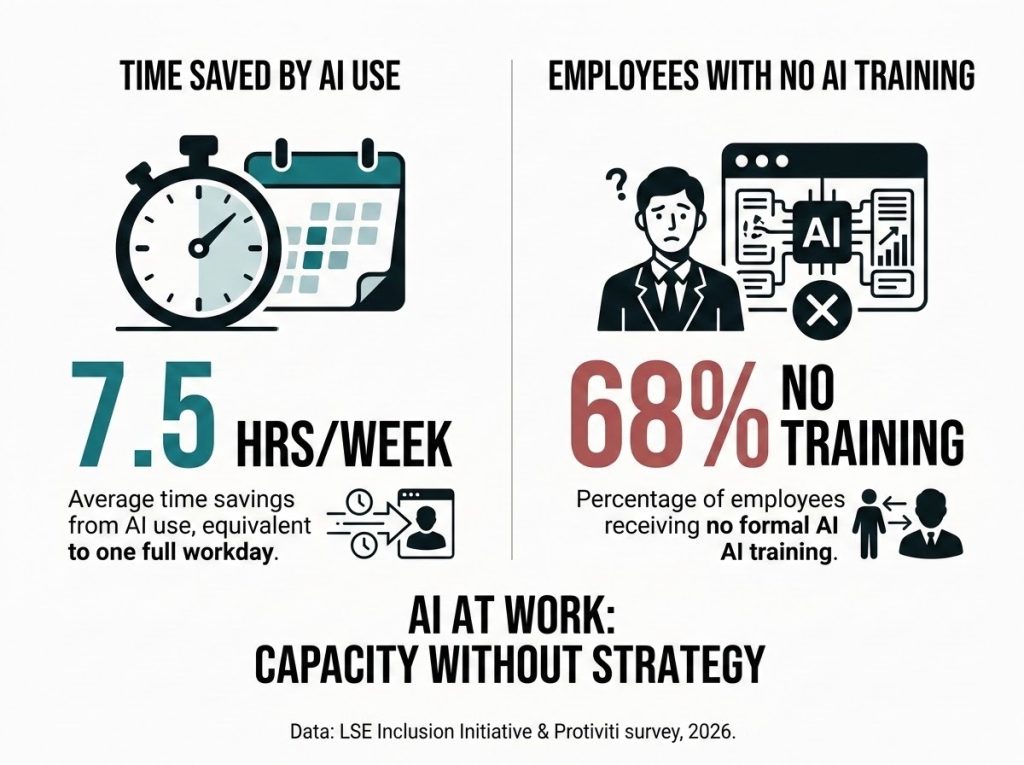
Professionals are getting a full workday back. The LSE Inclusion Initiative, working with Protiviti, surveyed nearly 3,000 workers and 240 executives worldwide and found that AI users are saving an average of 7.5 hours per week, worth roughly $18,000 per employee annually. But the same research found something that should worry every executive reading this: 68 percent of employees have received no formal AI training in the past year. Most people are sitting on capacity they don’t know how to redeploy.
The highest-value AI use is already shifting toward judgment, not drafting. Microsoft’s 2026 Work Trend Index analyzed over 100,000 Microsoft 365 Copilot conversations and found that 49 percent of all conversations now support cognitive work — analyzing information, solving problems, evaluating, and thinking creatively, rather than simple drafting or lookup tasks. That’s nearly half of all advanced AI use going toward the kind of thinking that used to require years of experience to do well.
The career ladder is compressing, fast. PwC’s 2026 Global AI Jobs Barometer, which analyzed more than a billion job postings across 27 territories, found that entry-level roles most exposed to AI are seven times more likely to require traditionally senior-level skills like judgment, leadership, and strategic thinking than the least AI-exposed entry-level roles. These “seniorized” entry-level roles grew 35 percent since 2019, while traditional entry-level postings shrank 10 percent over the same period.
Trusting AI blindly is a career hazard, not a shortcut. Microsoft’s research on Swiss AI users, some of the most advanced in the world, found that 84 percent treat AI output as a starting point, not a final answer, keeping human judgment and accountability at the center of how they work. The professionals winning with AI aren’t the ones who trust it most. They’re the ones who question it hardest.
Deep expertise is being rewarded, not replaced. The same PwC Barometer found that jobs “professionalized” by AI, where routine tasks get automated and human judgment becomes more central, are growing twice as fast as jobs “democratized” by AI, with 42 percent faster wage growth since. AI isn’t flattening expertise. It’s splitting the workforce into two tracks, and one of them pays a lot better.
Put those five findings together and the conventional “AI saves you time” story looks incomplete at best. The full picture is: AI creates capacity, most organizations haven’t built a strategy for that capacity, and the individuals who benefit most are the ones treating the freed-up time as a resource to redeploy, not a reward to the bank.
The Redeployment Principle: What I Recommend
Here’s the framework I highly advise, and it comes straight out of logistics thinking: freed-up capacity has to be redeployed toward the next objective, or it evaporates. I call it the Redeployment Principle, and it’s the single biggest difference I see between professionals who talk about AI and professionals who are actually changing their trajectory with it.
Most people treat the time AI saves them like leave — banked, personal, theirs to spend on catching up or slowing down. That’s a reasonable instinct, and I’m not going to tell you never to breathe. But if that’s all the freed-up time becomes, you’ve optimized a task and left the mission exactly where it was. The professionals who are actually moving up are running an audit: every time AI hands them back an hour, they ask what the next-highest-value use of that hour is, inside their actual career or business objective, not just their inbox. Sometimes that’s a strategic project. Sometimes it’s a skill gap they’ve been meaning to close, which matters given how many people are never trained to close it in the first place. The redeployment, not the time savings, is where the career equity gets built.
How Do You Actually Redeploy the Time AI Gives You Back?
This is where I’ve watched it work, both in my own team’s operations and with the professionals I coach through career transitions. The shift isn’t complicated, but it does require you to stop measuring AI’s value in minutes saved.
When my team first rolled out AI tools for case management and reporting, the early win looked exactly like the “save time” story: faster documentation, quicker turnaround on routine paperwork. The real change happened a few months later, once we stopped treating that freed-up time as slack in the schedule and started treating it as reassigned capacity, pointed at the parts of workforce development that actually move outcomes: deeper one-on-one coaching, employer partnership strategy, the work that used to get squeezed out because there was never enough room in the week. That’s the redeployment audit in practice, and it’s the same audit I now walk clients through regardless of industry.
6 Steps to Redeploy the Time AI Just Gave You Back
- Track what AI actually saves you for one week. Don’t estimate. Note every task you handed off and roughly how long it used to take. Most people underestimate this by half.
- Name the next-highest-value use of that time before the week ends. Not “catch up.” A specific project, skill, or relationship that’s been sitting at the bottom of your list because there was never room for it.
- Put one AI-freed hour a week toward a skill, not a task. Given how many professionals have never had formal AI training, start there if you’re not sure — even 30 minutes learning your tool’s advanced features compounds fast.
- Ask AI for the analysis, not just the draft. Instead of “write this email,” try “here’s the situation, what are the three strongest arguments and the one I’m missing.” That’s the judgment-level use that’s actually growing.
- Review every AI output before it leaves your hands, every time. No exceptions, no matter how good the tool gets. This single habit is what separates the professionals building trust from the ones building risk.
- Pick one piece of work each week to do without AI at all. Not out of distrust — to keep your own judgment sharp enough to know when the output in front of you is wrong.
Frequently Asked Questions
Is it bad to use AI just to save time on routine tasks?
No — routine automation is a legitimate use of AI. The risk isn’t using AI for time savings; it’s stopping there. If the hours you free up never get redirected toward higher-value work, you’ve optimized a task without changing your trajectory.
How much time are professionals actually saving with AI?
Research from the London School of Economics and Protiviti found AI users save an average of 7.5 hours per week, roughly the equivalent of one full workday, worth about $18,000 per employee annually in productivity gains.
Doesn’t relying on AI make professionals worse at critical thinking?
The data suggests the opposite among advanced users. Most AI users treat AI output as a starting point rather than a final answer, and nearly half of AI use now supports analysis and judgment rather than replacing it — the habit of reviewing, not the tool itself, protects your thinking.
Is AI making entry-level jobs disappear?
Not exactly — it’s changing what they require. AI-exposed entry-level roles are seven times more likely to demand traditionally senior skills like judgment and leadership than they used to, which raises the bar rather than removing the rung entirely.
What’s the single best first step to using AI more strategically at work?
Start tracking what AI actually saves you for one real week, then name a specific higher-value use for that time before assigning it anywhere else. Most people skip straight to the tool and never get to the redeployment step.
The Mission Isn’t Finished When the Task Is
Go back to that patrol for a second. A unit that gets more people and keeps running at the same pace isn’t wrong to feel relieved — the extra hands make the job easier. But relief was never the objective. The mission was.
AI just handed you a full workday back, every single week, whether you asked for it or not. You can spend it feeling caught up. Or you can ask the only question that’s ever actually moved a career or a team forward: if this task were already done, what’s the next objective I should be pointed at? That’s not a productivity hack. That’s a strategy. And a mission without one is just a longer patrol.
Keep Learning
- Are Agentic AI Phones Actually Ready to Take Over Your Smartphone?
- Why Do More AI Tools Make Your Team Less Productive?
- Should You Use AI to Save Time at Work, or to Solve Bigger Problems?
- What Is Agentic AI Ransomware, and How Do You Protect Yourself From It?
- How Fast Is Corporate AI Adoption Really Growing Right Now?
Sources researched for the content of this article
Microsoft, 2026 Work Trend Index — “Agents, human agency, and the opportunity” (the 49% cognitive-work stat)
https://www.microsoft.com/en-us/worklab/work-trend-index/agents-human-agency-and-the-opportunity-for-every-organization
London School of Economics Inclusion Initiative / Protiviti — “Bridging the Generational AI Gap: Unlocking Productivity for All Generations” (the 7.5 hrs/week, $18K/year, and 68% no-training stats)
https://www.lse.ac.uk/news/ai-boosts-productivity-by-the-equivalent-of-one-workday-per-week-new-report-finds
PwC, 2026 Global AI Jobs Barometer — press release (the 7x senior-skills stat, the 35% vs. -10% entry-level growth, the 2x-faster / 42%-wage-growth “professionalized vs. democratized” stat)
https://www.pwc.com/gx/en/news-room/press-releases/2026/pwc-2026-ai-jobs-barometer.html
Microsoft, “Swiss AI users outperform global peers on productivity” — Source EMEA (the 84% Switzerland-specific stat on treating AI output as a starting point)
https://news.microsoft.com/source/emea/2026/07/swiss-ai-users-outperform-global-peers-on-productivity/